
Turn visitors and commenters into engaged leads, subscribers and sales!

  1. Home
  2. Knowledge Base
  3. Functionality
  4. How To Delete A Follower’s Comment in Comment Converter

How To Delete A Follower’s Comment in Comment Converter

Comment Converter makes it easy to edit a follower and delete a comment they left on a post

In this article, you’ll learn how to edit a follower by deleting a comment they left in Comment Converter.

1. Navigate to your WordPress site’s dashboard.

2. From the WordPress admin menu select Converter to access the Comment Converter dashboard.
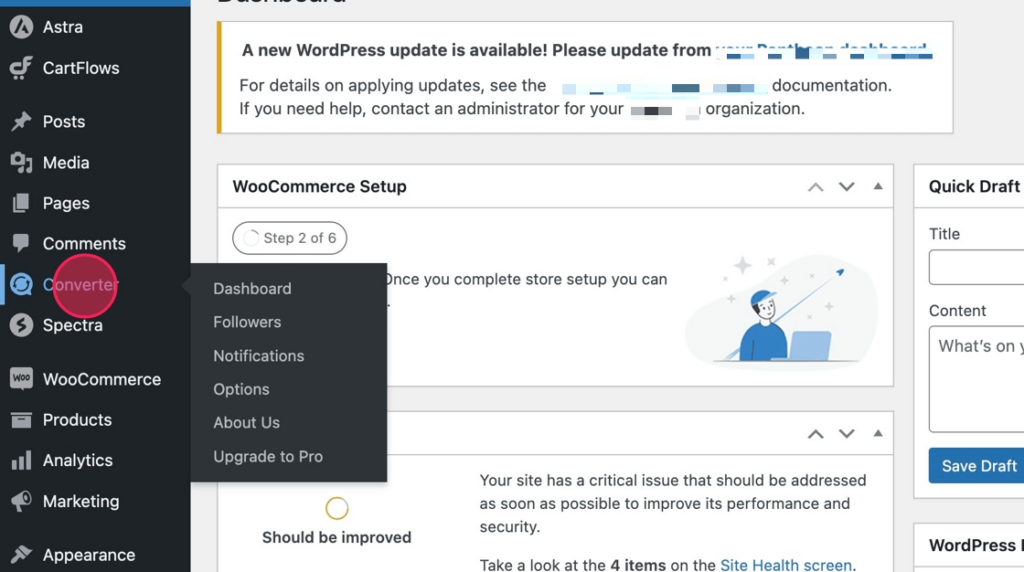
Select Converter from the WordPress Admin menu

3. Next, from the dashboard, select the Followers link from the Comment Converter menu

Select Followers from the Comment Converter dashboard menu

4. From your list of followers, select Edit from the follower you want to delete a comment from.
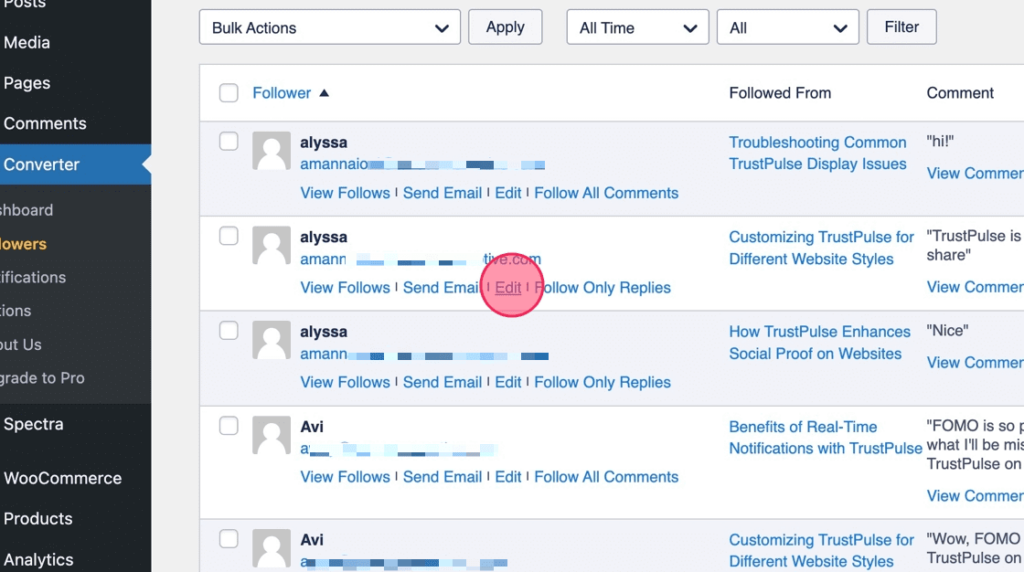
Select Edit under the follower you want to delete a comment from

5. Next, click the trash icon beside one of the listed Followed Comments.

Click the trash icon beside the followed comment

6. Select Proceed to complete the deletion

Select proceed to delete
Was this article helpful?

Related Articles

Leave a Reply

Your email address will not be published. Required fields are marked *

Need Support?

Can't find the answer you're looking for?
Contact Support
How To Delete A Follower’s Comment in Comment Converter